HHR Train App
Traveling between the holy cities of Makkah and Madinah should feel peaceful and effortless. The Haramain High-Speed Railway delivers exactly that—fast, modern, and comfortable journeys at up to 300 km/h along a 450 km route. No more exhausting road trips or uncertain schedules.
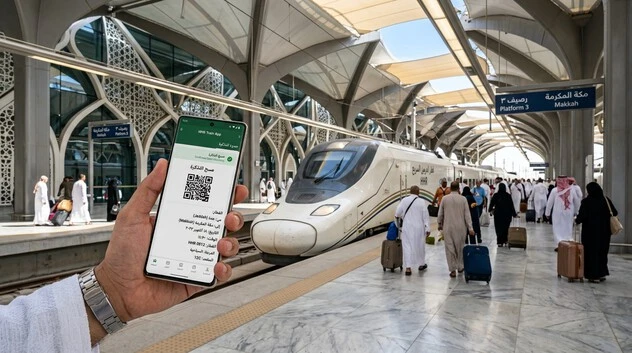
The HHR Train App serves as the official mobile solution for Saudi Arabia Railways (SAR). It puts complete control in your pocket. Pilgrims and travelers rely on this app to book Haramain train tickets quickly and reliably.
This powerful tool transforms your travel planning. You gain real-time booking with live availability. Interactive coach views let you select your exact seat. Mobile convenience fits perfectly into busy Umrah and Hajj itineraries. Check timetables, manage tickets, and receive instant updates wherever you are. The app supports Arabic and English, accepts MADA, Visa, and MasterCard, and integrates directly with the central booking system.
For millions heading to the Holy Mosques, the HHR Train App removes stress from the journey. It connects key stations seamlessly: Makkah (Rusaiyfah), Madinah, Jeddah (Al Sulaymaniyah), King Abdulaziz International Airport (KAIA), and King Abdullah Economic City (KAEC). Whether you arrive at the airport or move between the two holy cities, the app simplifies every step.
Prices remain competitive. Economy fares from Jeddah to Makkah start around SAR 35–70, while Makkah to Madinah runs SAR 145–225 depending on class and date. Business Class offers extra comfort with lounge access. Dynamic pricing rewards early booking, especially outside peak Hajj and Ramadan periods.
This complete 2026 guide covers everything you need. Learn how to download the HHR Train App on Android and iOS. Follow clear step-by-step booking instructions. Explore current prices and timetables. Pick up practical tips for pilgrims. And find solutions for common troubleshooting issues.
What is the HHR Train App?
The HHR Train App is the official mobile application for the Haramain High-Speed Railway. It connects travelers directly to Saudi Arabia’s flagship high-speed rail service under Saudi Arabia Railways (SAR).
The Haramain High-Speed Railway spans approximately 449–453 km of electrified track. Trains reach operational speeds of up to 300 km/h. This modern infrastructure links the holy cities of Makkah and Madinah while passing through Jeddah and King Abdullah Economic City (KAEC). A dedicated branch serves King Abdulaziz International Airport (KAIA).
Five key stations form the network:
- Makkah Station (Rusaiyfah)
- Madinah Station
- Jeddah Station (Al Sulaymaniyah)
- King Abdulaziz International Airport (KAIA) Station
- King Abdullah Economic City (KAEC) Station
The journey between Makkah and Madinah takes about two hours and twenty minutes. This high-speed rail project stands as a cornerstone of Saudi Vision 2030. It delivers efficient, safe, and comfortable pilgrim transport while supporting economic growth and sustainable mobility in the Kingdom.
The app was developed by Saudi Spanish Train Project Co. LTD in partnership with SAR. It brings the full power of the railway system to your smartphone. Designed specifically for passengers traveling to the Holy Mosques, the HHR Train App simplifies every aspect of your journey.
You can download it on two major platforms. On Google Play, the app has surpassed 1 million downloads with solid user ratings around 4.5 stars from thousands of reviews. The Apple App Store version is also available for iOS users. Both versions support Arabic and English languages, making them accessible for local residents and international pilgrims alike.
This high-speed rail service plays a vital role in pilgrim transport. It eases pressure during Umrah and Hajj seasons by offering a reliable alternative to road travel. Passengers enjoy climate-controlled coaches, comfortable seating in Economy or Business Class, and smooth rides that respect prayer times and religious needs.
The HHR Train App goes beyond basic booking. It integrates real-time data from the entire network. Users access live schedules, seat availability, and service updates. This official tool ensures you interact directly with SAR’s central system instead of third-party platforms.
Built with pilgrims in mind, the app reflects Saudi Vision 2030’s focus on smart, technology-driven services. It helps millions travel between the Holy Cities with dignity, comfort, and peace of mind.
Understanding the HHR Train App starts here. Next, explore its powerful features that make booking and traveling seamless.
Key Features of the HHR Train App
The HHR Train App stands out by delivering practical tools that make Haramain High-Speed Railway travel simple and efficient. Built for pilgrims and everyday travelers, it connects you directly to Saudi Arabia Railways (SAR) systems for a smooth experience.
Here are the core features that set it apart:
- Real-time timetable and availability calendar: Check live schedules and seat availability instantly. The powerful calendar shows every service, including dynamic updates during peak Umrah and Hajj seasons. No more outdated information or surprises at the station.
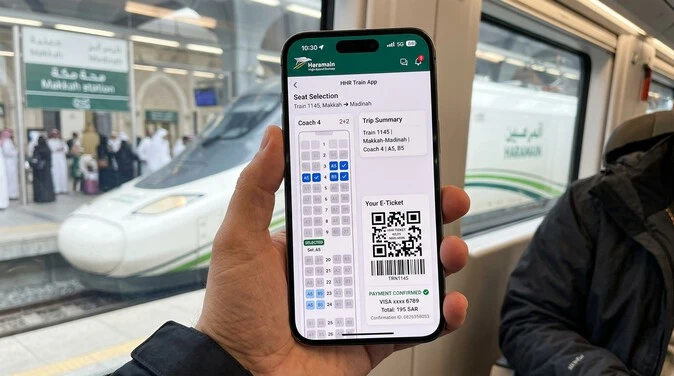
- Interactive coach and seat selection view: View the full coach layout at a glance. Select your preferred seat based on direction of travel and position. Change seats with one click if needed. This visual tool ensures you travel comfortably in Economy or Business Class.
- Easy booking with passenger details: Complete reservations in minutes. Enter traveler information, choose class, and confirm details quickly. The user-friendly interface supports multiple passengers and integrates with your profile for faster future bookings.
- Secure payment options: Pay directly with MADA, Visa, or MasterCard. Transactions process securely through the central system. You receive immediate confirmation via email and SMS with your QR e-ticket ready on your phone.
- Ticket management and real-time updates: Store all bookings in one place. View, manage, or track your journeys easily. Get live notifications about delays, gate changes, or platform information. Access your full sales history as a registered member.
- Station information with Google Maps integration: Find exact station locations, contact numbers, and facilities. Integrated maps guide you from arrival points like King Abdulaziz International Airport (KAIA) to boarding areas at Makkah (Rusaiyfah), Madinah, Jeddah, or King Abdullah Economic City (KAEC).
- Member registration for booking history: Create an HHSR member profile to save personal details. Enjoy quicker bookings, access past tickets, and manage preferences. This feature streamlines repeat travel for frequent Umrah visitors.
These capabilities make the app a complete companion for high-speed rail journeys. It supports Saudi Vision 2030’s vision of smart, pilgrim-focused transport while reducing stress on the 449 km route.
App vs Website vs Ticket Counters
| Aspect | HHR Train App | Official Website (sar.hhr.sa) | Ticket Counters / Kiosks |
| Convenience | Book anywhere, anytime on mobile | Good on desktop, needs internet | Requires travel to station |
| Seat Selection | Interactive coach view + one-click change | Basic selection | Limited or first-come basis |
| Real-time Updates | Push notifications + live data | Available but less proactive | Staff updates only |
| Payment Options | MADA, Visa, MasterCard | Same cards | Cards + Cash (SAR) |
| Ticket Management | Full history, easy modifications* | Good for new bookings | Manual process |
| Speed During Peak | Fastest for registered users | Reliable | Long queues in Hajj/Ramadan |
| Best For | Pilgrims, frequent travelers | Detailed planning from home | Last-minute or cash payments |
*Note: Some modifications may require account login and work better via app or website than counters.
The app excels in mobility and visual tools. Many users report quicker bookings compared to the website during busy periods. Counters remain useful for cash payments or assistance but often involve longer waits.
Overall, the HHR Train App combines speed, clarity, and control. It turns complex high-speed rail travel into a straightforward process tailored for visitors to the Holy Cities.
This strong foundation leads naturally into the next step: downloading and installing the app on your device.
How to Download and Install the HHR Train App
Getting the HHR Train App takes just a few minutes. Follow these simple steps for Android or iOS devices. Once installed, you gain instant access to Haramain High-Speed Railway bookings.
For Android Users (Google Play)
- Open the Google Play Store on your device.
- Search for “HHR Train” or “Haramain Train”.
- Select the official app by Saudi Spanish Train Project Co. LTD.
- Tap Install.
- Wait for the download to complete, then open the app.
The app requires about 60-70 MB of storage and runs smoothly on most recent Android versions.
For iOS Users (Apple App Store)
- Open the App Store on your iPhone or iPad.
- Search for “HHR Train”.
- Choose the official app developed for Haramain High-Speed Railway.
- Tap Get and authenticate with Face ID, Touch ID, or your Apple ID password.
- Launch the app after installation.
Post-Installation Setup
- Allow necessary permissions for notifications, location (for station maps), and storage.
- Open the app and select your preferred language: Arabic or English.
- Register a new account or log in to access full booking features and save passenger details.
Common Troubleshooting Tips
- Region availability: The app is available in Saudi Arabia and most countries. If it doesn’t appear, switch your Google Play or App Store region to Saudi Arabia temporarily, or use a VPN. International pilgrims often succeed this way.
- Storage issues: Free up at least 100 MB before installing. Clear cache in Play Store or App Store if the download fails.
- Permission problems: Go to device Settings > Apps > HHR Train. Enable storage, notifications, and location access manually. Restart your phone and try again.
- App not downloading: Update your operating system and app store. Check your internet connection — a stable Wi-Fi works best.
- Login or crash issues: Clear app cache/data (Android) or offload/reinstall (iOS). Ensure your device meets minimum requirements.
Most users complete installation and first booking within 10 minutes. The app connects directly to SAR’s system, so you stay updated on real-time schedules for routes like Jeddah to Makkah or Makkah to Madinah.
With the HHR Train App installed, you are ready to book tickets effortlessly. The next section walks you through the complete booking process step by step.
How to Book Tickets Using the HHR Train App
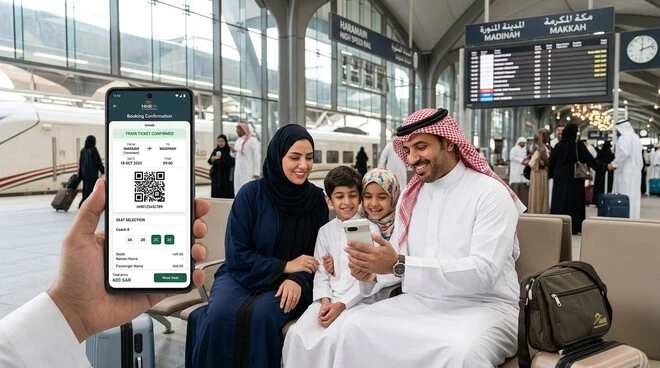
Booking tickets on the HHR Train App is straightforward and fast. This official tool connects you directly to Saudi Arabia Railways (SAR) for Haramain High-Speed Railway services. Follow these clear steps to secure your seats on routes between Makkah, Madinah, Jeddah, KAIA, and KAEC.
1. Open the App and Register or Log In
Launch the HHR Train App on your Android or iOS device.Select your language — Arabic or English.
If you are a new user, tap Register. Provide your phone number, email, and personal details. Verify via OTP.Existing users simply log in with saved credentials.
A registered account saves passenger information and booking history for quicker future trips. This step takes under two minutes and unlocks full features.
2. Search for Your Trip
On the home screen, choose One Way or Round Trip.Select your departure station (e.g., Jeddah Al Sulaymaniyah or KAIA) and arrival station (e.g., Makkah Rusaiyfah or Madinah).
Pick your travel date using the powerful calendar. It shows real-time availability.Enter the number of passengers.
Tap Search.The app instantly displays all available services with times, durations, and prices. Dynamic pricing appears clearly — fares rise closer to departure, especially during Umrah and Hajj peaks.
Pro Tip: Book early. Tickets for popular routes like Makkah to Madinah often sell out or become more expensive near travel dates.
3. Select Service and Class
Review the results. Choose your preferred train time.
Pick your class:
- Economy Class — affordable and comfortable for most pilgrims.
- Business Class — extra legroom, lounge access, and quieter environment.
Prices update live. For example:
- Jeddah to Makkah: Economy SAR 35–70, Business ~SAR 111.
- Makkah to Madinah: Economy SAR 145–225, Business up to SAR 390.
Confirm the service and proceed.
4. Choose Seats via Interactive Coach View
The app shows a clear coach layout.See seat direction and position at a glance.Tap your preferred seats. You can change them with one click.The system highlights available seats in real time.For group bookings, select multiple adjacent seats together.This visual tool is one of the app’s strongest features compared to the website or counters.
5. Enter Passenger Information
Fill in details for each traveler.Use saved profiles from your account to speed this up.Enter full names exactly as on passports or IDs, date of birth, and ID numbers.Add contact details if needed.Review carefully — errors can cause issues at boarding.
6. Review and Pay
Double-check your itinerary, class, seats, passengers, and total fare.Accept terms and conditions.Choose payment method: MADA, Visa, or MasterCard.Enter card details securely and confirm.Payment processes instantly. You receive confirmation immediately.
7. Receive Your QR E-Ticket
Your ticket arrives via email and SMS right away.It contains a scannable QR code.Save it in the app or download the PDF.No printing needed — show the QR code at the gate.Keep the app installed for real-time updates on delays or platform changes.
Additional Tips for Success
- Book at least 1–2 weeks ahead for best prices and seat availability.
- Group bookings work well but require all passenger details upfront.
- Dynamic pricing rewards flexibility — off-peak times cost less.
- Check luggage rules in the app before travel (25kg allowance typical).
- During Hajj or Ramadan, book even earlier due to high demand on this high-speed rail service.
This complete process usually takes 5–10 minutes. The HHR Train App delivers a user-friendly booking experience tailored for pilgrims heading to the Holy Cities.
With tickets in hand, you are ready for a smooth, comfortable journey. Next, explore the full network of stations and popular routes.
Haramain Train Stations and Routes
The Haramain High-Speed Railway network features five modern stations. Each station is designed for pilgrims and travelers moving efficiently between the holy cities and key entry points. The 449 km high-speed line supports speeds up to 300 km/h. It forms a vital part of Saudi Vision 2030 for smart pilgrim transport.
Makkah Station (Rusaiyfah)
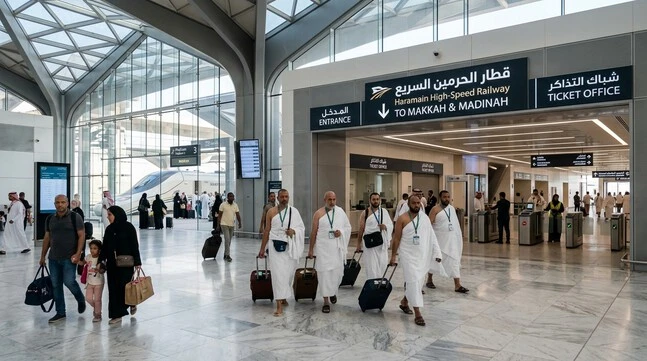
This terminal station sits in the Rusaiyfah district, just 3 km from the Grand Mosque (Masjid al-Haram). Its golden architectural theme reflects the spiritual importance of Makkah. Large halls, prayer facilities, and ample parking make it ideal for Umrah and Hajj pilgrims. The station connects seamlessly to local transport. It serves as the southern gateway for journeys to Madinah, Jeddah, or the airport. Many pilgrims begin or end their high-speed rail experience here, close to the holiest site in Islam.
Madinah Station
Located about 7 km from Al-Masjid an-Nabawi in the Knowledge Economic City area, this station uses a serene green color scheme. It offers a peaceful environment suited for visitors to the Prophet’s Mosque. Spacious waiting areas, restaurants, and prayer rooms support longer stays. As the northern terminus, it handles heavy traffic during religious seasons. Travelers appreciate the quick access to Madinah’s holy sites after a comfortable ride from Makkah or Jeddah.
Jeddah Station (Al Sulaymaniyah)
This central station lies in the Al Sulaymaniyah district of Jeddah. Its silver design blends modern efficiency with local character. It serves as a major transit hub connecting coastal Jeddah with the holy cities. Business travelers and pilgrims arriving in Jeddah use it frequently. Excellent links to city transport and shopping areas make it highly convenient. The station handles both short trips to Makkah and longer journeys to Madinah.
King Abdulaziz International Airport (KAIA) Station
This dedicated branch station connects directly to Jeddah’s main airport. It opened in 2019 and offers seamless transfers for international arrivals. Passengers step off planes and board the high-speed train within minutes. The station features clear signage and luggage-friendly design. It serves as the perfect entry point for pilgrims flying into Jeddah before heading to Makkah or Madinah. This integration reduces travel stress significantly after long flights.
King Abdullah Economic City (KAEC) Station
Situated in Rabigh near the Hejaz Gate, this station supports the growing economic hub. It connects the main line between Jeddah and Madinah. Modern facilities serve both business passengers and residents. While less crowded than holy city stations, it provides valuable access for those combining work with Umrah visits. The stop adds flexibility to the network.
Popular Routes on the Haramain High-Speed Railway
The HHR Train App displays all services clearly. Prices vary with dynamic pricing, booking time, and demand. Book early for the best fares, especially before Hajj or Ramadan.
| Route | Duration | Economy Price (SAR) | Business Price (SAR) |
| Jeddah → Makkah | ~45-50 min | 35–70 | ~111 |
| Makkah → Madinah | ~2h 20m | 145–225 | 250–390 |
| Jeddah → Madinah | ~1h 50m | 115–180 | 210+ |
| KAIA (Airport) → Makkah | ~1h 10m | 50–80 | 100–150 |
| Makkah → Jeddah | ~45 min | 40–70 | ~100 |
| Madinah → Makkah | ~2h 20m | 145–225 | 250–390 |
| KAIA → Madinah | ~2h 30m | 130–200 | 220–350 |
| Jeddah → KAEC | ~45-60 min | 40–80 | 90–130 |
| KAEC → Makkah | ~1h 30m | 80–140 | 160–250 |
These routes cover the most common needs for pilgrims. Direct Makkah-Madinah services run multiple times daily. Airport connections prove especially popular for new arrivals. Shorter Jeddah-Makkah trips offer quick access from the city or port.
Each journey delivers smooth, air-conditioned comfort in Economy or Business Class. Business Class provides extra space, lounge access, and priority boarding. The entire network prioritizes safety, punctuality, and respect for religious needs with prayer areas and appropriate timing.
Stations feature unified modern design with large chandeliers, clean facilities, shops, and cafes. They handle extreme desert temperatures while offering VIP lounges and ample parking. For pilgrims, this high-speed rail service transforms long, tiring road journeys
Latest Timetables and Pricing 2026
Haramain High-Speed Railway fares follow dynamic pricing. Prices change based on demand, booking time, class, and season. The HHR Train App shows live rates, so you always see current options.
Seasonal Variations
Peak periods drive the biggest increases. During Hajj 2026 and Ramadan, demand surges. Economy fares on popular routes can rise 50-100% or more. Business Class during Hajj peaks often reaches SAR 850+ for high-demand trips. Off-peak months offer the lowest prices with better seat availability. Plan ahead — tickets for religious seasons sell out quickly despite expanded capacity of over 2.2 million seats for Hajj 2026.
Summary of Current Schedules
Multiple daily services run across the network. Trains operate from early morning until late evening. Makkah-Madinah journeys take about 2 hours 20 minutes. Shorter routes like Jeddah to Makkah last 45-50 minutes.
For the most accurate and up-to-date timetables, visit the official source:
Typical daily frequency includes:
- Makkah ↔ Madinah: 8–12+ services per direction.
- Jeddah ↔ Makkah: Frequent short trips, ideal for airport connections.
- KAIA Airport connections: Direct trains to Makkah and Madinah for seamless arrivals.
Schedules adjust slightly during peak seasons with extra trips added. The app’s powerful calendar displays real-time availability and any changes.
Sample Pricing (Approximate Base Ranges – 2026)
Prices fluctuate daily. These reflect typical off-peak to moderate demand:
| Route | Duration | Economy (SAR) | Business (SAR) |
| Jeddah → Makkah | 45-50 min | 35–70 | ~111 |
| KAIA → Makkah | ~1h 10m | 50–80 | 100–150 |
| Jeddah → Madinah | ~1h 50m | 115–180 | 210+ |
| Makkah → Madinah | ~2h 20m | 145–225 | 250–390 |
| Madinah → Makkah | ~2h 20m | 145–225 | 250–390+ |
Tips for Best Deals and Promotions
- Book early: Secure lowest fares 2–8 weeks in advance. Prices rise sharply closer to departure.
- Be flexible: Mid-week and off-peak hours often cost less.
- Monitor promotions: The HHR Train App and official site regularly show special offers. Registered members sometimes access exclusive discounts.
- Check children and special needs discounts: Children receive up to 50% off in Economy. Eligible passengers with special needs get significant reductions.
- Group bookings: Book together for better availability during busy periods.
- Avoid last minute: Peak Hajj and Ramadan dates fill fast. Use the app’s alerts for price drops when possible.
Always verify exact prices and times inside the HHR Train App. It pulls directly from SAR’s system and shows live promotions.
Smart planning with the app helps you enjoy comfortable high-speed travel between the Holy Cities without stress. Book at the right time, and you will save money while ensuring a smooth journey.
This brings us to real user experiences. The next section reviews the app’s strengths and weaknesses.
HHR Train App Review: Pros, Cons & User Experiences
The HHR Train App delivers a convenient way to book Haramain High-Speed Railway tickets. Real pilgrims and travelers share mixed experiences. Here is a balanced, honest review based on thousands of recent user feedbacks.
Many users praise the app for its core strengths.
- Convenience: Book from anywhere at any time. The mobile-first design fits perfectly into busy Umrah and Hajj schedules.
- Interactive seat view: Clear coach layout lets you pick exact seats. This visual feature stands out as one of the best tools for comfortable travel.
- Real-time information: Live timetables, availability, and updates keep you informed. Push notifications help during unexpected changes.
Pilgrims especially appreciate quick booking for routes like Jeddah to Makkah or Makkah to Madinah. The app saves time compared to counters during peak seasons.
Several pain points frustrate users regularly.
- Occasional crashes: iOS users report frequent crashes, especially during account creation and booking. Android performs better but still faces slowdowns.
- Login and account issues: Many struggle to register, recover passwords, or log in. The process often freezes or rejects valid details.
- Limited far-future bookings: You cannot always reserve tickets weeks or months ahead. This creates problems during high-demand Hajj and Ramadan periods.
Other complaints include slow performance, payment failures, and difficulty modifying or canceling tickets without a stable account.
Aggregated Ratings & Common Feedback
- Google Play (Android): Mixed ratings around 3.1–4.5 stars from thousands of reviews. Many highlight ease of use, while others mention technical glitches.
- Apple App Store (iOS): Lower average of approximately 2.6–2.8 stars from hundreds of ratings. Users frequently describe it as unreliable for critical travel needs.
Common positive feedback: “Fast booking when it works” and “Great seat selection.”
Common negative feedback: “App crashes at payment screen,” “Cannot create account,” and “No proper support for cancellations.” International pilgrims often face extra challenges with verification and payments.
Alternatives to the HHR Train App
If the app does not work smoothly, consider these options:
- Official Website (sar.hhr.sa): More stable for some users. It offers similar booking features but lacks the interactive coach view on mobile.
- Nusuk App Integration: Useful for Umrah packages. It sometimes links to train bookings, though with possible extra fees.
- Third-party affiliates: Platforms like 12Go or authorized agents provide alternatives. They may charge service fees but help when official channels fail. Ticket counters at stations remain reliable for last-minute or cash payments.
Final Verdict
The HHR Train App excels in convenience and visual tools when it functions well. However, technical issues, especially on iOS, reduce reliability for many pilgrims. Test it early and have backup plans ready.
SAR continues to improve the system as part of Saudi Vision 2030. For now, patience and early booking remain key to a smooth high-speed rail experience between the Holy Cities.
This review prepares you for real-world use. The next section shares practical travel tips to make your journey even better.
Travel Tips for Haramain Train Passengers
Smart preparation turns your Haramain High-Speed Railway journey into a peaceful, efficient experience. These practical tips help pilgrims and travelers navigate the 449 km route with confidence.
Luggage Rules
Each passenger may carry one large suitcase (max 25 kg, dimensions 65 × 55 × 35 cm) plus one personal hand item such as a backpack, handbag, laptop bag, or nursery bag. You must carry all luggage yourself from security to the train. Overhead racks hold hand items while designated shelves accommodate larger suitcases.
Excess baggage is not allowed. Overweight or oversized bags may be rejected or sent on a later service. Prohibited items include anything explosive, flammable, or disruptive. Zamzam water bottles count toward your weight limit. Pack light, especially during Umrah or Hajj when stations get busy. Hire a porter at the station for SAR 20–30 if needed. This keeps boarding smooth and stress-free.
Boarding Process
Arrive at the station 30–45 minutes before departure (60–90 minutes during Hajj or peak Umrah). Follow this sequence:
- Security screening (airport-style).
- Ticket QR code scan at electronic gates.
- Enter waiting hall.
- Listen for platform announcements.
- Board and find your assigned seat.
Trains maintain strict punctuality. Boarding starts 15–20 minutes before departure. Keep your HHR Train App open for real-time gate and platform updates. Families and groups should stay together during screening.
Prayer Facilities
All stations provide dedicated prayer rooms for men and women. Trains include onboard prayer areas so you can pray without losing your seat. This thoughtful design respects the needs of pilgrims traveling between Masjid al-Haram and Al-Masjid an-Nabawi. Prayer times align well with schedules. Bring a small prayer mat if preferred, though clean onboard spaces suffice.
Umrah and Hajj Specific Advice
Plan your journey around religious requirements. For Madinah to Makkah trips, enter Ihram before crossing the Meeqat (Dhul-Hulayfah). Wear Ihram clothes at your hotel or station and make your niyyah on time.
During Hajj and peak Umrah, book early and expect higher crowds and prices. Carry essentials: comfortable shoes for walking at stations, a small bag for passport and phone, and a light jacket for air-conditioned coaches. Stay hydrated — stations offer water coolers. Use the HHR Train App to monitor live updates and avoid last-minute rushes. Coordinate with your group for smooth transfers to the Holy Mosques upon arrival.
What to Expect Onboard: Economy vs Business Class
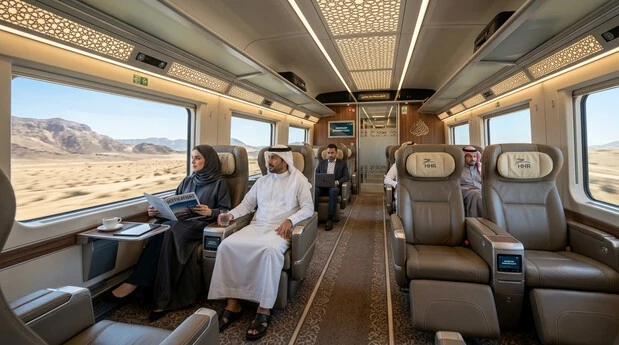
Economy Class offers comfortable seating in a 2+2 layout. You get foldable armrests, tables, headrests, power outlets, and clean restrooms. It suits most pilgrims with good value and sufficient legroom for the journey duration.
Business Class provides a premium experience in a quieter 2+1 layout. Expect wider seats, extra legroom, priority boarding, lounge access at major stations, and complimentary snacks or meals. It includes better entertainment options and more personal space — ideal for longer Makkah-Madinah trips or travelers seeking rest.
Both classes feature air conditioning, Wi-Fi (moderate to good), and a cafeteria in the fifth coach. The ride stays smooth and quiet at high speeds. Business Class feels more luxurious, while Economy delivers reliable comfort at lower cost.
Safety, Dress Code, and Accessibility
Safety standards remain high. Security checks, surveillance, and trained staff ensure secure travel. Follow crew instructions and stay seated during the journey.
Dress according to Saudi traditions — modest clothing that respects local customs. The train is fully air-conditioned, so layer lightly.
The network supports accessibility well. Ramps, elevators, dedicated seating, and assistance for passengers with disabilities are available. Inform staff in advance via the app or at the station for priority support. Wheelchair users and families receive helpful guidance.
Additional practical tips:
- Charge devices before travel.
- Download offline maps.
- Keep your QR ticket accessible.
- Avoid traveling with animals (not permitted).
These steps help you focus on worship and enjoyment rather than logistics. The Haramain High-Speed Railway, as a key part of Saudi Vision 2030, delivers safe, comfortable pilgrim transport when you prepare wisely.
With these tips, your journey between the Holy Cities becomes part of a meaningful spiritual experience. Next, learn how to handle common problems with the HHR Train App.
Common Problems & Troubleshooting the HHR App
The HHR Train App makes Haramain High-Speed Railway booking easier, but technical glitches can appear at critical moments. Pilgrims often face these issues during Umrah or Hajj planning. Here are the most common problems with practical solutions.
App Not Working or Crashing
Many users report sudden crashes, slow loading, or frozen screens, especially on iOS.
Solutions:
- Update the app to the latest version in Google Play or App Store.
- Clear cache (Android: Settings > Apps > HHR Train > Storage > Clear Cache). For iOS, offload or reinstall the app.
- Restart your device and try on stable Wi-Fi instead of mobile data.
- Switch between Arabic and English language in app settings.
- If it persists, uninstall, restart phone, and reinstall fresh.
Payment Failures
Payment rejections are very common, even with valid cards. International users face extra challenges.
Solutions:
- Try a different card (MADA works best for locals).
- Use the app on Android if you are on iOS — it tends to be more stable.
- Check your bank for international transaction blocks.
- Ensure sufficient balance and correct billing details.
- Book during off-peak hours when system load is lower.
- If payment processes but ticket does not appear, wait 10–15 minutes and check your email/SMS before retrying.
Ticket Modification and Cancellation Issues
Users struggle to change dates, upgrade class, or cancel bookings. Refunds can take time.
Solutions:
- Log in with the same account used for booking.
- Go to “My Bookings” in the app and select the ticket.
- Follow on-screen options for modification or cancellation.
- Cancellations usually incur fees depending on timing. Check rules in the app.
- For complex cases, visit the ticket office at the station with your QR code and ID.
Other Frequent Issues
- Login/Registration failures: Use correct OTP, try different browsers or devices, and avoid special characters in passwords.
- Tickets not received: Check spam folder. Re-login to the app to view digital tickets.
- Seat availability errors: Seats may sell out quickly during dynamic pricing spikes. Refresh the search multiple times.
Official Support Channels
Contact support quickly when needed:
- Phone: Call 920 004 433 (Saudi toll-free number). Best during business hours. International users may need +966 prefix.
- Email: hhrcrm@hhr.sa
- In-app / Website: Use the official sar.hhr.sa contact form.
- At Stations: Speak directly to staff at any HHR station (Makkah Rusaiyfah, Madinah, Jeddah, KAIA, or KAEC).
Have your booking reference number, phone number, and travel details ready when contacting support. Responses can take 24–48 hours via email, so phone calls work faster for urgent issues.
Prevention Tips
- Book early to avoid peak-hour system strain.
- Take screenshots of every step, especially payment confirmations.
- Keep a backup plan — website or station counters ready.
- Test the app with a small booking well before your main journey.
Most problems resolve with basic troubleshooting or direct support. The HHR Train App improves over time as part of Saudi Vision 2030, but preparation helps you stay in control.
With these fixes, you can handle challenges confidently and focus on your spiritual journey between the Holy Cities.
Frequently Asked Questions
1. What is the HHR Train App?
The HHR Train App is the official mobile application developed by Saudi Spanish Train Project Co. LTD for Saudi Arabia Railways (SAR). It allows users to book, manage, and track tickets on the Haramain High-Speed Railway connecting Makkah, Madinah, Jeddah, KAIA, and KAEC.
2. How to download the HHR Train App for Android and iOS?
Android users can download it from Google Play by searching “HHR Train”. iOS users can find it on the App Store. Direct links are available in earlier sections. Ensure you select the official app by Saudi Spanish Train Project Co. LTD.
3. What are HHR Train ticket prices in 2026?
Prices follow dynamic pricing. Jeddah to Makkah starts from SAR 35–70 (Economy). Makkah to Madinah ranges SAR 145–225 (Economy) and SAR 250–390 (Business). Fares rise significantly during Hajj and Ramadan. Always check live prices in the app.
4. Can I cancel tickets in the HHR Train App?
Yes, you can cancel through “My Bookings” if logged in with the same account. Cancellation fees apply depending on timing. Some modifications may require station support.
5. Is the HHR Train App safe and secure?
Yes. The app connects directly to SAR’s official system. Payments use secure gateways (MADA, Visa, MasterCard). Always download from official stores and avoid sharing login details.
6. How do I book Haramain train tickets using the app?
Open the app, register or log in, search your route and date, select class and seats, enter passenger details, review, and pay. The full step-by-step guide appears earlier in this article.
7. Which stations does the Haramain High-Speed Railway serve?
The network includes Makkah (Rusaiyfah), Madinah, Jeddah (Al Sulaymaniyah), King Abdulaziz International Airport (KAIA), and King Abdullah Economic City (KAEC).
8. What is the difference between Economy and Business Class?
Economy Class offers comfortable 2+2 seating at lower prices. Business Class provides wider 2+1 seats, extra legroom, lounge access, priority boarding, and better onboard service. Both classes are clean and air-conditioned.
9. Does the HHR Train App support group bookings?
Yes. You can add multiple passengers during booking and select adjacent seats through the interactive coach view.
10. How can I check real-time timetables?
Use the app’s powerful calendar on the search screen. It shows live availability and updates. For the latest schedules, also visit sar.hhr.sa/timetable.
11. What are the luggage rules for HHR trains?
Each passenger can carry one suitcase (max 25 kg, 65×55×35 cm) plus one small hand item. You must handle your own luggage. Excess baggage is not permitted.
12. Why is my HHR Train App not working?
Common causes include outdated version, poor internet, cache issues, or login problems. Update the app, clear cache, restart your device, or reinstall. Android version is generally more stable than iOS.
13. Can I modify my ticket after booking?
Limited modifications are possible in the app under “My Bookings”. Major changes like date or route often require contacting support or visiting a station.
14. How early should I book tickets for Hajj or Umrah?
Book 2–8 weeks in advance for best prices and seats. During Hajj and Ramadan, book as early as possible as trains fill quickly due to high demand.
15. What are the alternatives if the HHR Train App fails?
Use the official website sar.hhr.sa, visit ticket counters at stations, or try authorized third-party platforms like Nusuk or affiliates. Phone support at 920 004 433 is also available.
Conclusion
The HHR Train App stands as the most convenient way to experience the Haramain High-Speed Railway. It brings real-time booking, interactive seat selection, live updates, and full ticket management directly to your phone. Pilgrims and travelers gain peace of mind on the 449 km journey connecting Makkah, Madinah, Jeddah, KAIA, and KAEC.
This official SAR tool simplifies high-speed rail travel. You avoid long queues, choose comfortable seats, and stay informed throughout your trip. Whether traveling for Umrah, Hajj, or regular visits to the Holy Mosques, the app supports Saudi Vision 2030’s goal of efficient, dignified pilgrim transport.
From downloading and booking to managing tickets and troubleshooting, this 2026 guide covered every essential detail. You now understand stations, routes, prices, classes, luggage rules, and practical tips for a smooth journey.
Download the HHR Train App now and enjoy seamless travel between the Holy Cities.