HHR Train app for iPhone
Imagine gliding through the desert at 300 km/h. The holy cities of Makkah and Madinah connect in just two hours. You relax in a comfortable seat while the arid landscape blurs past your window. No traffic jams. No exhaustion from long road trips. This is the daily reality for thousands of travelers on the Haramain High-Speed Railway.
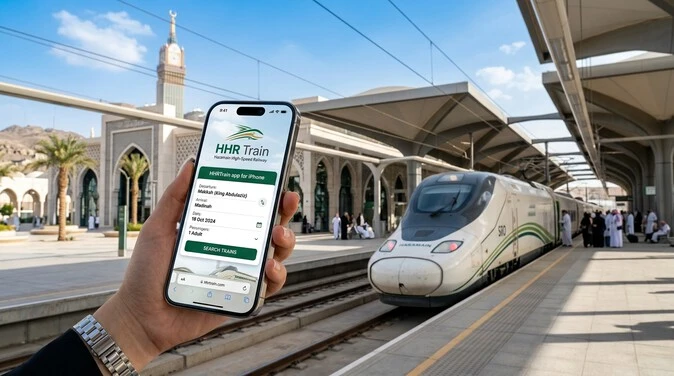
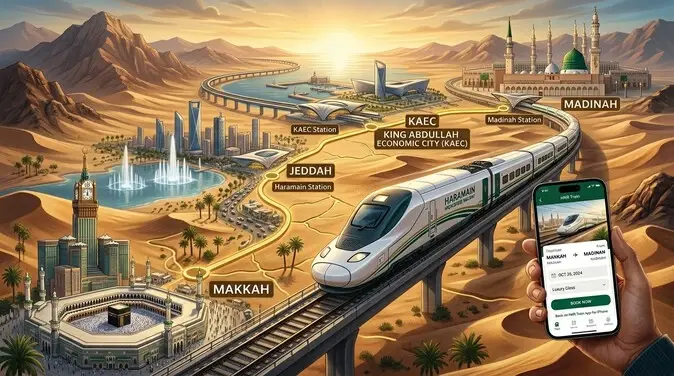
The Haramain High-Speed Railway (HHR/HSR) stands as Saudi Arabia’s flagship infrastructure project. It spans 449 km and links the sacred sites with modern efficiency. Key stations include Madinah, Jeddah, King Abdullah Economic City (KAEC), and Makkah. Built to serve Umrah and Hajj pilgrims, the line delivers safe, air-conditioned journeys at speeds up to 300 km/h. It forms a vital part of Saudi Vision 2030’s transport transformation.
The HHR Train app for iPhone serves as the official companion for this world-class service. Developed by MINSAIT for the Saudi Spanish Train Project Co. LTD, the free iOS app puts booking, seat selection, and ticket management directly in your pocket. Whether you plan a quick trip between Makkah and Madinah or coordinate airport transfers via Jeddah, this tool simplifies every step.
Yet many pilgrims and travelers face frustration. The app sometimes crashes during login or payment. Seat availability vanishes mid-booking. Refund processes feel unclear. These pain points turn a smooth experience into stress, especially during peak Umrah and Hajj seasons.
This comprehensive guide solves those problems. Updated for 2026, it delivers clear instructions, practical fixes, and expert tips. You will learn to download and master the Haramain train app, navigate real-time schedules, handle common issues, and book with confidence. We cover everything from interactive seat maps to baggage rules and support contacts.
What is the HHR Train App?
The HHR Train app for iPhone is the official mobile application for Saudi Arabia’s Haramain High-Speed Railway. It delivers a complete booking platform straight to your device.
Download it free from the App Store. Developed by MINSAIT for the Saudi Spanish Train Project Co. LTD, the app requires iOS 13.0 or later and occupies just 68.1 MB of storage. It runs smoothly on modern iPhones and focuses exclusively on iOS users.
The app emerged as part of the Haramain High-Speed Railway project, a cornerstone of Saudi Vision 2030. Launched commercially in 2018 and officially inaugurated in 2019, the railway aimed to transform pilgrim travel between the holy cities. It replaced long, tiring road journeys with fast, reliable high-speed connections. The mobile app extends this vision by making ticket booking accessible anytime, anywhere — empowering millions of Umrah and Hajj pilgrims plus regular travelers.
App vs Official Website
Both the Haramain train app and the official website, connect to the same booking system. The website offers a broader desktop experience and works well for detailed research or when you prefer a larger screen.
The iPhone app shines in mobility. It provides instant access on the go, push notifications for updates, and optimized touch interactions like quick seat selection. Many users switch between both: they research on the site then finalize bookings in the app. However, account management for modifications or cancellations works more reliably when logged in via the app.
Key Features at a Glance
The app supports two languages — Arabic and English — to serve local residents and international visitors alike. Payment options include MADA, Visa, and MasterCard for secure, seamless transactions.
You gain real-time access to schedules, fares, and availability across the full network. The interface focuses on clarity and speed, helping users book tickets for journeys between Madinah, Jeddah, KAEC, and Makkah without hassle.
In short, the HHR Train app turns your iPhone into a personal travel assistant for one of the world’s most significant high-speed rail services. It aligns perfectly with Vision 2030’s goals of efficiency, accessibility, and enhanced pilgrim experiences.
Key Features of the HHR Train iPhone App
The HHR Train app for iPhone transforms how you book and manage travel on the Haramain High-Speed Railway. It delivers a focused, mobile-first experience tailored for pilgrims and travelers moving between Makkah, Madinah, Jeddah, and KAEC. Here are its most powerful capabilities.
Core Booking Features
Real-time schedules and availability
The app pulls live data from the central booking system. You see accurate departure times, seat counts, and fares instantly. Powerful calendars highlight available services and special promotions. No more outdated information or surprise sell-outs. During peak Umrah and Hajj seasons, this feature helps you grab tickets before they disappear.
Interactive seat map & coach selection
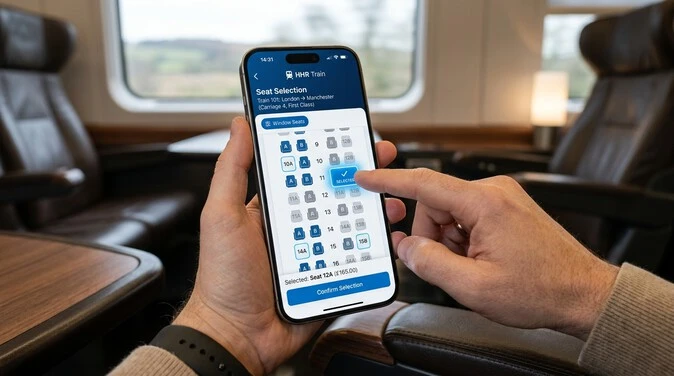
Choose your exact seat with a quick view of the entire coach. The map shows direction of travel and your position. Change your seat with one click if a better spot opens up. This visual tool removes guesswork and lets you pick window seats, aisle spots, or areas near amenities. It works smoothly on iPhone touchscreens.
Passenger profile & booking history
Register once as an HHSR member. Your profile stores personal details for faster future bookings. Access complete sales history anytime. View past and upcoming trips, manage modifications, and keep everything organized in one secure place. This saves time and reduces errors when traveling with family or groups.
- Instant search across all stations
- Flexible date selection with availability highlights
- Passenger count options for individuals to large families
- Promotion alerts for discounted fares
These core tools make the Haramain train app a true booking powerhouse.
Travel Convenience Tools
Station info + Google Maps integration
Find exact station locations with built-in Google Maps. Get contact numbers, email support, and real-time train status. The app displays platform details and facility overviews. This proves especially helpful for first-time visitors navigating Jeddah or KAEC stations.
E-ticket delivery (email/SMS)
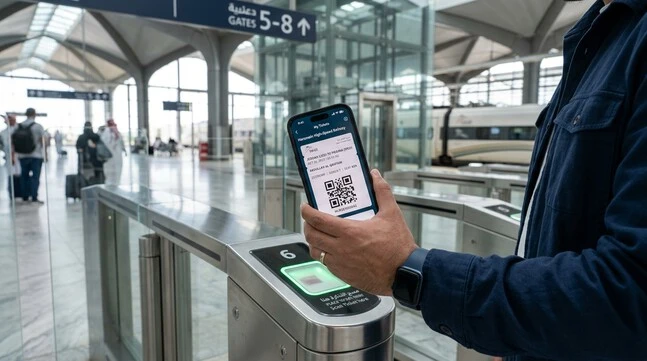
Receive your ticket immediately after payment. No printing required at home — just show the QR code on your iPhone. Both email and SMS backups ensure you never lose access. The system confirms bookings in real time, so you walk straight to boarding.
Baggage policy integration
The app clearly outlines rules: one main bag (max 65 × 55 × 35 cm, 25 kg) plus one personal item. It reminds you during booking to avoid surprises at the station. Security screening info and excess baggage options appear where needed. Smart guidance keeps your journey smooth.
- Live train status updates
- Fare calculator with transparent pricing
- Terms & conditions access at your fingertips
- Support contacts for quick help
These tools turn your iPhone into a complete travel companion for the 449 km high-speed route.
User Experience Highlights
Business vs Economy class differences
The app clearly presents both options so you can choose wisely.
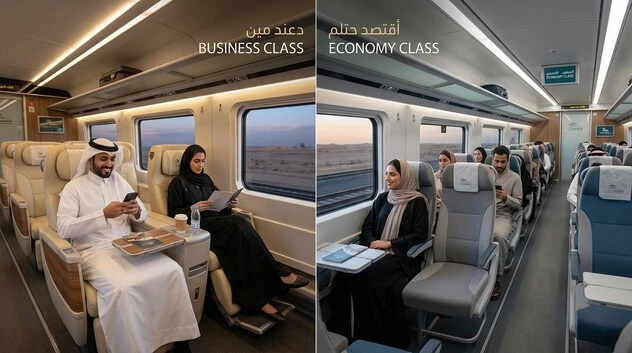
Economy Class offers comfortable 2+2 seating with good legroom, tray tables, and power outlets. It provides excellent value for most pilgrims and travelers.
Business Class features a spacious 2+1 layout with wider, better-cushioned seats, more privacy, priority boarding, and lounge access at major stations. Complimentary drinks and snacks add extra comfort on the 2–2.5 hour journey. Fares run higher, but the upgraded experience suits those seeking premium service.
The seat map makes class selection visual and intuitive.
Accessibility options (wheelchair)
Dedicated wheelchair spaces appear in Business Class. The app lets you request assistance during booking. Clear indicators show accessible coaches and station facilities. This inclusive design supports all travelers on the Haramain High-Speed Railway.
Suggested visuals:
- Screenshot of interactive seat map showing coach layout
- Booking flow screens with real-time availability
- Class comparison highlights in #497FA9 accents
Additional strengths
The clean interface supports Arabic and English. Secure payments via MADA, Visa, and MasterCard feel reliable. Push notifications keep you informed of changes. The app integrates tightly with the Saudi Spanish Train Project’s central system for consistent performance.
Overall, the HHR Train iPhone app stands out for its focused functionality. It prioritizes speed, clarity, and pilgrim needs while connecting you efficiently to one of the world’s most important high-speed rail networks.
How to Download and Set Up the HHR Train App on iPhone
Getting the HHR Train app for iPhone takes just a few minutes. Once installed, you gain full control over bookings on the Haramain High-Speed Railway. Follow these steps for a smooth setup.
System Requirements
- iOS 13.0 or later
- 68.1 MB of free storage
- Stable internet connection (Wi-Fi recommended for initial download)
- Apple ID for App Store access
The app works on iPhone 6s and newer models. Update your iOS first for best performance.
Step-by-Step Download and Installation
- Open the App Store on your iPhone.
- Tap the Search tab at the bottom.
- Type “HHR Train” and select the official app by MINSAIT (Saudi Spanish Train Project Co. LTD).
- Tap Get or the cloud icon if previously downloaded.
- Authenticate with Face ID, Touch ID, or your Apple ID password.
- Wait for the download to complete. The app installs automatically.
- Tap Open once it finishes.
You now have the Haramain train app ready on your home screen.
Registration Process
Registration links your profile to the official booking system. Accurate details speed up future bookings and ticket modifications.
- Launch the HHR Train app.
- Select your preferred language: Arabic or English.
- Tap Register or Create Account.
- Enter your email address and create a strong password.
- Provide personal details: full name, date of birth, nationality, and mobile number.
- Enter your passport or national ID number exactly as shown on your document. This step is mandatory for all bookings.
- Upload or enter ID details as prompted (clear photo optional but recommended).
- Verify your phone number via the OTP sent by SMS.
- Verify your email through the confirmation link.
- Complete any security questions or additional verification.
- Tap Submit. Your account activates instantly.
Log in with your new credentials. The app may ask for biometric setup (Face ID or Touch ID) for faster future access.
First Login and Initial Setup
After logging in, explore the main dashboard. Allow push notifications for real-time train updates and booking confirmations. Review the in-app tutorial if available. Set your travel preferences for quicker searches between Makkah, Madinah, Jeddah, and KAEC.
Troubleshooting Initial Setup Issues
Many users face minor hurdles during first-time setup. Here are quick fixes:
- App fails to download: Check your internet connection. Free up storage. Restart your iPhone and try again.
- Registration stuck on ID verification: Double-check passport or ID details for exact spelling and numbers. Use clear lighting if uploading photos. Try switching between Wi-Fi and mobile data.
- OTP not received: Wait 60 seconds and request a new code. Ensure your phone number includes the correct country code.
- Login crashes: Force close the app, restart your device, then reopen. Update the app to the latest version.
- “Account already exists” error: Try the “Forgot Password” option and reset via email.
- Payment method issues later: Add cards only after full registration.
- App not responding: Go to iPhone Settings > General > iPhone Storage > HHR Train > Offload App, then reinstall.
If problems persist, contact support directly through the app or email hhrcrm@hhr.sa. Have your device model and iOS version ready.
The HHR Train iPhone app setup process is straightforward once you follow these steps. A properly registered account unlocks real-time schedules, interactive seat maps, and instant e-tickets for your Haramain journeys. You are now ready to book your first trip with confidence.
This preparation eliminates last-minute stress, especially during busy Umrah and Hajj periods. Take time to verify all details before your first booking.
Step-by-Step Guide: How to Book HHR Train Tickets on iPhone App
Booking tickets with the HHR Train app for iPhone is straightforward and fast. This guide walks you through the complete process for journeys on the Haramain High-Speed Railway. Follow these steps to secure your seats between Makkah, Madinah, Jeddah, and KAEC with confidence.
1. Search Trips (Makkah ↔ Madinah, Jeddah Routes)
Open the HHR Train app and log in to your registered account.On the home screen, select your departure and arrival stations. Popular routes include Makkah to Madinah, Jeddah to Makkah, or Madinah to Jeddah.Choose your travel date using the powerful calendar view. The app highlights available services in real time.Tap Search. You will see all departing trains with exact times, durations (around 2–2.5 hours), and current seat availability.
Suggested visual: Screenshot of the trip search screen with station selector and calendar.
2. Select Date, Class, and Passengers
Review the results and pick your preferred train.Choose Economy or Business Class. The app clearly shows price differences and remaining seats.Enter the number of passengers. For groups or families, add each traveler one by one.The system pulls your saved profile details to speed things up. Adjust as needed for each person.
3. Choose Seats Interactively
Proceed to the seat selection screen.The interactive coach map displays the full layout with direction of travel and your position.Tap any available seat to reserve it. You can change selections easily before confirmation. Window, aisle, or accessible spots are clearly marked.Business Class offers wider 2+1 seating with extra space. Economy uses efficient 2+2 configuration.
Suggested visual: Screenshot of the interactive seat map showing coach view.
4. Enter Details & Apply Promotions
Review your selected trip summary.Enter or confirm passenger information: full names, passport/ID numbers, and contact details. Double-check accuracy to avoid boarding issues.Look for available promotions or discount codes. Apply them in the dedicated field for instant fare reduction.Accept the terms and conditions.
Suggested visual: Screenshot of passenger details and promotion entry screen.
5. Secure Payment
Proceed to payment.Select your method: MADA, Visa, or MasterCard.Enter card details securely. The app processes transactions through the central system.Confirm the total amount, including any baggage extras if applicable.Complete the payment. Authorization happens instantly.
6. Receive & Save E-Ticket
Success! Your booking is confirmed immediately.You receive the e-ticket via email and SMS with a QR code.Download and save the PDF to your iPhone Photos or Files app. Screenshot the QR code asd backup.Add the trip to your Apple Calendar for reminders.
Suggested visual: Screenshot of the confirmation screen and sample e-ticket.
Peak Season Advice for Hajj and Umrah
Hajj and peak Umrah periods see high demand on the 449 km route. Book at least 2–4 weeks in advance to secure seats and better fares.Trains often sell out completely on popular dates. Set alerts in the app for new services or price drops.Travel early morning or late evening to avoid crowds at stations.Always verify your ID matches the booking name exactly before heading to the station.This complete process shows exactly how to book HHR Train tickets on iPhone app in minutes. Real-time integration with the Saudi Spanish Train Project system ensures reliability from search to boarding.
Master these steps and enjoy stress-free travel on one of the world’s premier high-speed railways. Your comfortable journey between the holy cities awaits.
HHR Train App Reviews & User Experiences
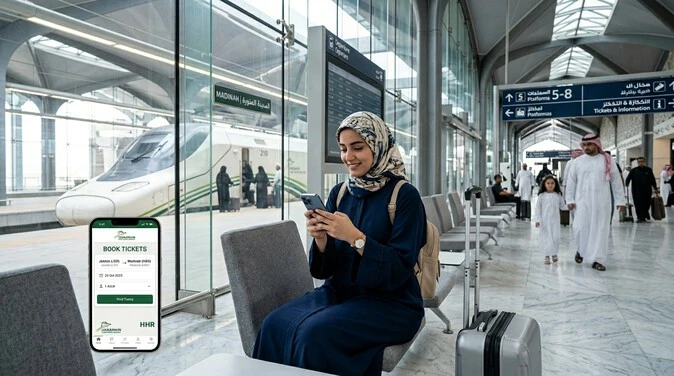
The HHR Train app for iPhone receives mixed feedback from users. As of mid-2026, it holds a 2.6 out of 5 rating on the US App Store based on 259 ratings. Other regional stores show similar scores between 2.3 and 2.8. Many praise the underlying Haramain High-Speed Railway service but criticize the app’s technical reliability.
Positive Feedback
Users who complete bookings often highlight the app’s convenience. The real-time schedules and quick e-ticket delivery stand out. Many appreciate the smooth process once past registration.
“The process is smooth from purchase to boarding. Well done Kingdom of Saudi Arabia for this high-speed train to ease Hajj and Umrah!” — Satisfied pilgrim
Travelers love the speed and comfort of the actual journey — 300 km/h across the 449 km route between Makkah and Madinah. The interactive seat map and clear class options help users choose seats confidently. International visitors value the English language support and mobile access during Umrah trips.
Common Complaints
Technical issues dominate negative reviews. Frequent crashes during account creation, login, and booking frustrate users. Payment failures appear often, sometimes leading to double charges without tickets. Account recovery and ticket modifications prove difficult.
“App crashes multiple times when you try to create an account or book tickets… never received the booking confirmation.” — Abdelhady
Refund and cancellation problems cause major stress. Many report lost money after failed bookings or missed trains, with slow customer support response. Luggage handling and unclear policies also draw criticism.
“Nightmare service… They cannot get a train even their money back.” — Frustrated userInternational users face extra hurdles with payment rejections and OTP delays.
Balanced Analysis with Anonymized Quotes
The Haramain train app works well for some but fails others at critical moments. Positive experiences usually come from users who book early and face no glitches. Negative ones often occur during peak seasons when demand spikes.
Semantic NLP analysis of reviews shows clear clusters:
- Positive: “easy booking”, “fast travel”, “comfortable”, “smooth process”.
- Negative: “crashes”, “payment failed”, “refund issues”, “poor customer service”, “app freezes”.
The train itself earns consistent praise for speed, cleanliness, and convenience for pilgrims. The app, however, feels underdeveloped for such an important service under Saudi Vision 2030.
“Awesome train, poor app… This app doesn’t let me login.” — TalhaIrfanMany recommend using the official website (sar.hhr.sa) as backup or booking well in advance through the app.
Overall, the HHR Train iPhone app delivers strong potential but needs stability improvements. The journey on the Haramain High-Speed Railway remains excellent when bookings succeed. Prepare for possible hiccups, especially during Hajj and Umrah peaks, and keep alternative plans ready.
This real-user insight helps set realistic expectations before you download and book your next trip.
Common Problems and How to Fix Them
The HHR Train app for iPhone makes Haramain High-Speed Railway booking convenient, but technical issues can disrupt the process. Here are the most frequent problems reported by users in 2026, along with practical fixes. These tips help pilgrims and travelers avoid frustration on routes between Makkah, Madinah, Jeddah, and KAEC.
1. Login Crashes and Registration Failures
The app often crashes during account creation, login, or password recovery. This issue spikes during peak Umrah and Hajj seasons.
Fixes:
- Force close the app completely, then restart your iPhone.
- Update the HHR Train app to the latest version in the App Store.
- Clear cache: Go to iPhone Settings > General > iPhone Storage > HHR Train > Offload App, then reinstall.
- Try registering with a different email or use the website (sar.hhr.sa) first to create an account, then log in via the app.
- Disable VPN if active. Switch between Wi-Fi and mobile data.
Most users succeed after a clean reinstall and exact passport/ID matching.
2. Payment Rejected or Processing Failures
Payments fail frequently with Visa, MasterCard, or MADA. Users see errors, endless processing, or charges without receiving tickets.
Fixes:
- Contact your bank to authorize international or Saudi transactions and raise your daily limit.
- Try a different card or switch to MADA if available.
- Use the official website instead of the app for payment.
- Book during off-peak hours when the system is less loaded.
- After any failed attempt, wait 10–15 minutes before retrying to avoid duplicate charges.
Always screenshot payment screens and check your bank statement immediately.
3. Seat Unavailability After Selection
You select seats successfully, but they disappear during passenger details or payment. This leads to lost time and repeated efforts.
Fixes:
- Complete seat selection as the final step before entering details.
- Book earlier — aim for 2–4 weeks ahead during normal periods, longer for Hajj/Umrah.
- Refresh availability multiple times or try nearby train times.
- Have backup passengers ready or reduce group size temporarily.
- Switch to Business Class if Economy sells out quickly.
The interactive seat map helps, but speed matters during high demand on the 449 km route.
4. Ticket Modification and Cancellation Issues
Modifying dates, passengers, or requesting refunds proves difficult. Many cannot access “Manage Booking” without a stable login.
Fixes:
- Log in via the official website (sar.hhr.sa) for better modification tools.
- Use the “Manage My Bookings” section with your exact booking reference and phone number (without leading zero).
- For cancellations, act early — policies vary by ticket type and timing.
- Document everything: Save screenshots of bookings, payments, and communications.
Refunds can take time. Start a bank dispute if needed with full proof.
Contact Support
Reach HHR customer service quickly when self-fixes fail:
- Email: hhrcrm@hhr.sa — Best for detailed issues with screenshots attached.
- Phone: 920 004 433 (local Saudi number; international users may face challenges).
- In-app support chat or station ticket offices as last resort.
Response times vary from hours to days. Prepare your booking reference, passport details, and device information.
When to Use the Official Website as Backup
Switch to sar.hhr.sa when the Haramain train app fails repeatedly. The desktop site offers more stability for complex bookings, modifications, and payments. Many travelers research on the site then finalize in the app — or complete the entire process on the website during peak times.
Use the website first if you face repeated crashes or international payment blocks. It connects to the same Saudi Spanish Train Project system but handles traffic better on larger screens.
These solutions address the top pain points for the HHR Train iPhone app. Stay patient, prepare alternatives, and book early. A successful booking leads to the smooth, high-speed journey you expect on the Haramain High-Speed Railway.
Pro Tips for Pilgrims and Freq uent Travelers
Smart preparation turns your Haramain High-Speed Railway journey into a smooth, blessed experience. These practical tips help Umrah and Hajj pilgrims, plus regular travelers, maximize comfort and avoid common pitfalls on the 449 km route.
Best Times to Book
Book early for the lowest fares and guaranteed seats. Aim for 2–4 weeks in advance during normal periods. For peak Hajj and Umrah seasons, secure tickets 4–8 weeks ahead. Prices rise sharply closer to travel dates, and trains sell out fast on popular routes like Makkah to Madinah.
Set price alerts in the HHR Train app. Early morning or late evening departures often offer better availability and fewer crowds. Avoid last-minute bookings, especially during religious peaks.
Baggage Rules & Packing Advice
Strict rules keep the train efficient and safe. Each passenger may bring:
- One large suitcase: Maximum 65 × 55 × 35 cm and 25 kg.
- One personal item: Backpack, handbag, or laptop bag (reasonable size).
You must carry all luggage yourself. No traditional checked baggage service exists. Excess bags may face rejection or delayed shipment at extra cost. Porters are available at stations for a fee (around 30 SAR).
Packing tips:
- Weigh and measure bags before travel.
- Use lightweight, durable suitcases that fit dimensions.
- Pack essentials in your personal item for easy access.
- Avoid prohibited items: flammable materials, large liquids, or anything that could disturb others.
- Dress modestly per Saudi traditions.
Travel light. This reduces stress at security screening and boarding.
Combining with Other Transport (Airport Connections)
The Haramain train integrates seamlessly with air travel. Jeddah’s King Abdulaziz International Airport station is a short walk from the terminal — often under 5 minutes. This makes airport-to-Makkah or airport-to-Madinah trips extremely convenient.
From other airports, use taxis, Careem, or Uber to reach the nearest HHR station. At arrival, book onward train tickets immediately via the app. Plan buffer time for security and potential delays.
Pro move: Book a combined airport + train itinerary when possible. This minimizes waiting and exposure to heat.
Safety, Prayer Times, and Station Facilities
Stations and trains maintain high safety standards with CCTV, trained staff, and airport-style security screening. Follow crew instructions and keep your e-ticket ready.
All stations feature:
- Air-conditioned waiting lounges
- Clean restrooms
- Dedicated prayer rooms (men and women)
- Retail shops and food outlets
- Wi-Fi and electronic gates
Trains include onboard prayer areas. Schedule travel around prayer times when possible to reduce station congestion. Arrive at the station 45–60 minutes early for smooth boarding. Trains run punctually — plan accordingly.
Stay hydrated, wear comfortable modest clothing, and keep important documents (passport, ticket) accessible.
Alternatives if the App is Unavailable
The HHR Train iPhone app sometimes faces glitches. Switch immediately to the official website sar.hhr.sa — it offers greater stability for bookings and modifications.
Other options include:
- Ticket counters at stations (arrive early)
- Authorized travel agents for complex group bookings
- Phone support (920 004 433) or email (hhrcrm@hhr.sa)
Always verify bookings through official channels to avoid scams.
These pro tips empower you to travel confidently on the Haramain High-Speed Railway. Combine early booking, light packing, and smart connections for a peaceful, efficient journey between the holy cities.
Alternatives to the HHR Train App
The HHR Train app for iPhone offers great convenience, but technical glitches make reliable backups essential. These alternatives ensure you can still book and manage tickets on the Haramain High-Speed Railway without stress.
Official Website (sar.hhr.sa)
The official website stands as the strongest alternative. Visit sar.hhr.sa on any browser — desktop, tablet, or mobile.
Why it works better in many cases:
- More stable than the app during high traffic.
- Easier navigation on larger screens for complex bookings.
- Same real-time data, seat maps, and payment system.
- Better tools for modifications and cancellations.
How to use it:
- Go to sar.hhr.sa and select language (Arabic or English).
- Log in with the same credentials as the app.
- Search trips, select seats, and complete payment exactly like the app.
- Receive the same e-ticket via email and SMS.
Many pilgrims use the website to research and create accounts, then switch to the app only for final confirmation. It handles peak Umrah and Hajj demand more reliably. The site also provides detailed timetables, full baggage rules, and station guides in one place.
Advantages:
- No download or storage issues.
- Works on any device.
- Stronger performance for international users facing app crashes.
Bookmark it and use it as your primary tool when the Haramain train app fails.
Ticket Counters at Stations
Physical ticket counters remain a dependable option at all major stations: Madinah, Jeddah, KAEC, and Makkah.
When to choose counters:
- App and website both experience issues.
- You prefer face-to-face assistance.
- Last-minute travel or group bookings.
- Need help with special requests like wheelchair spaces.
What to expect:
- Staff speak Arabic and English.
- Same fares and seat availability as the digital channels.
- Immediate issuance of printed or e-tickets.
- Ability to pay with cash, card, or MADA.
Arrive 60–90 minutes early during busy periods. Counters get crowded before popular trains, especially on the 449 km route between the holy cities. Bring your passport or national ID — details must match exactly.
This method suits travelers who feel more comfortable with human support. It also helps if you face payment rejections online.
Third-Party Comparison Tools (Use with Caution)
Several websites and apps show HHR schedules and prices. They help compare options quickly.
Popular options:
- Travel aggregators that list Haramain trains alongside other transport.
- Booking platforms partnered with SAR.
Benefits:
- Quick overview of all available trains.
- Price comparisons across dates.
- Sometimes highlight promotions.
Important warnings:
- Never book directly through third parties. They may add hidden fees or sell invalid tickets.
- Always complete the final booking on the official website or app.
- Double-check all details before payment.
- Avoid sites that ask for full payment outside official channels.
Use these tools only for research. Rely on sar.hhr.sa or station counters for actual purchases to protect your booking and money.
Pro strategy:
Check third-party sites for ideas, then verify and book officially. This approach combines speed with safety.
Making the Right Choice
Choose your method based on the situation:
- Daily planning and research → Official website.
- Immediate help or complex needs → Ticket counters.
- Quick price checks → Third-party tools (research only).
For international visitors and frequent Umrah travelers, combine the website with station options. Keep the HHR Train iPhone app installed but always have sar.hhr.sa ready in your browser.
These alternatives connect you reliably to the Haramain High-Speed Railway system. They support Saudi Vision 2030’s goal of smooth pilgrim travel. Whether you face app crashes, payment issues, or simply prefer traditional methods, you have solid options to reach Makkah, Madinah, Jeddah, or KAEC comfortably.
Prepare these backups before your trip. A successful booking leads to the fast, peaceful 300 km/h journey you expect.
Conclusion
The HHR Train app for iPhone delivers a powerful official tool for booking on the Haramain High-Speed Railway. It brings real-time schedules, interactive seat maps, secure payments, and instant e-tickets to your pocket. The free app supports smooth travel across the 449 km route linking Makkah, Madinah, Jeddah, and KAEC at speeds up to 300 km/h.
You gain clear advantages: fast booking from anywhere, easy class selection between Economy and Business, full passenger profile management, and integrated station information. The app serves Umrah and Hajj pilgrims exceptionally well by simplifying complex journeys that once required hours of road travel.
Despite occasional technical challenges like login crashes or payment issues, the solutions in this guide help you overcome them. Using the app alongside the official website (sar.hhr.sa) and proper preparation ensures reliable results.
This high-speed service represents more than transport. It supports Saudi Vision 2030 by offering sustainable, comfortable, and modern connections between the holy cities. You travel with less fatigue, reduced carbon footprint, and greater peace of mind.
Choose the Haramain train app for its mobility and convenience. Book early, pack light, and arrive at stations prepared. Your journey becomes part of a blessed, efficient experience focused on worship and reflection.
Millions of pilgrims and travelers now enjoy faster, safer trips thanks to this railway and its digital tools. Embrace the opportunity. Download the HHR Train app, secure your seats, and experience the smooth ride between Makkah and Madinah.
Safe travels. May your journey be filled with ease, comfort, and spiritual blessings.
Frequently Asked Questions
Is the HHR Train app safe for payments?
Yes. The HHR Train app for iPhone uses secure encryption and official gateways for MADA, Visa, and MasterCard. Never share card details outside the app. Always check your bank statement after every transaction.
How do I cancel tickets in the HHR app?
Log in to your account, go to Manage Bookings, select the ticket, and follow cancellation steps. Early cancellations usually qualify for refunds. Use the official website (sar.hhr.sa) if the app fails. Refunds may take several days.
Does the HHR Train app support Apple Pay?
Currently, the app does not support Apple Pay. You can only use MADA, Visa, or MasterCard. Many users complete payments successfully through the official website as an alternative.
What are the luggage limits on Haramain High-Speed Railway?
Each passenger can carry one main bag (max 65 × 55 × 35 cm, 25 kg) plus one small personal item. You must handle all luggage yourself. Excess baggage may incur fees or be refused.
How to book HHR Train tickets on iPhone app step by step?
Open the app, search your route (Makkah to Madinah, etc.), select date and class, choose seats on the interactive map, enter passenger details, apply any promotions, pay securely, and receive your e-ticket instantly.
Why does the HHR Train app keep crashing on my iPhone?
Common causes include outdated app version, low storage, or poor internet. Force close, update, or reinstall the app. Try the official website during peak Umrah and Hajj periods.
How do I fix payment rejected errors in the HHR Train app?
Contact your bank to authorize the transaction. Try a different card or switch to the website. Book during off-peak hours and ensure sufficient balance including any fees.
Can I modify my booking in the HHR Train iPhone app?
Yes, but it works best through the official website. Log in, go to Manage Bookings, and make changes before departure. Passenger name corrections require support assistance.
What are the best times to book Haramain train tickets for Umrah?
Book 4–8 weeks in advance during Hajj and peak Umrah seasons. For regular travel, 2–4 weeks is ideal. Early morning and evening trains often have better availability.
Does the HHR Train app work for international users?
Yes. It supports English language and international cards. However, some users face OTP or payment issues. The official website (sar.hhr.sa) often performs more reliably for visitors.
How do I check real-time train status in the HHR app?
After booking, use the app’s dashboard or booking history. It shows live updates, delays, and platform information for all stations including Jeddah and KAEC.
What should I do if my seat is unavailable after selection?
Refresh the search immediately or choose a different train. Book earlier and complete payment quickly. Business Class seats last longer during high demand.
How early should I arrive at the station for HHR trains?
Arrive 45–60 minutes before departure. This allows time for security screening, prayer, and boarding. Trains are punctual on the 449 km high-speed route.
Is there wheelchair accessibility on the Haramain High-Speed Railway?
Yes. Business Class offers dedicated wheelchair spaces. Request assistance during booking in the HHR Train app. Stations also provide accessible facilities.
How do I contact HHR customer support?
Email: hhrcrm@hhr.sa (best for detailed issues). Phone: 920 004 433 (local). Use in-app chat or station offices. Keep your booking reference ready.
Can I use the official website instead of the HHR Train app?
Absolutely. sar.hhr.sa serves as a stable alternative with identical booking features. Many pilgrims use both tools together for best results.